
Starlink Standard 4 Dubai
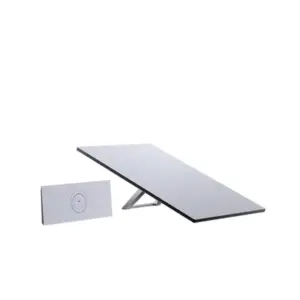
Starlink Standard 4 is the current Standard terminal bundle built around the rectangular electronic phased-array Starlink antenna, a Dual PoE power supply and the compact Router Mini. It is important to identify this exact bundle before buying because Starlink now distinguishes Standard 4 from Standard 4 X: Standard 4 uses Router Mini, while Standard 4 X uses Router 3. For Dubai and UAE buyers, that difference affects indoor Wi-Fi coverage, wired network planning, power layout, accessory selection and the best fit for homes, site offices, remote locations and business backup links.
110° field of view
IP67 Type 4 terminal
Router Mini Wi-Fi 6
Identify Standard 4 Before You Order
The naming is the first buying decision. Starlink has updated the names used for its Standard kits. The kit previously described as the Standard Kit is now called Standard 4 X, while the Standard terminal supplied with Router Mini is called Standard 4. Starlink also notes that the Standard 4 terminal hardware is what many customers previously called Gen 3 Starlink. This matters because UAE quotations and online listings may still use older expressions such as Gen 3, V4, Standard Kit, Standard V4 or Standard 4. A buyer should therefore compare the actual contents of the box rather than relying only on a title.
| Decision point | Standard 4 | Standard 4 X |
|---|---|---|
| Router | Router Mini | Router 3 |
| Wi-Fi profile | Compact dual-band Wi-Fi 6 | Higher-capacity tri-band Wi-Fi 6 |
| Power layout | Dual PoE supply powers the Starlink path and Router Mini connection | Separate Standard power architecture with Router 3 bundle |
| Best starting point | Compact home, small office, remote site or buyer who plans a separate LAN | Larger/busier indoor Wi-Fi requirement or preference for Router 3 |
| Fourteck reference | This page | Starlink Standard Kit Dubai |
If a supplier describes the product only as “Starlink V4” or “Gen 3,” ask which router and power supply are included. This single check prevents many accessory, Wi-Fi and installation mismatches.
What Comes in the Standard 4 Kit?
Current Starlink setup documentation for Standard 4 lists a practical seven-part hardware path. The terminal is supplied with its kickstand for temporary placement, while the Dual PoE power supply sits between AC power, the Starlink terminal and Router Mini. The router is not an outdoor device, so the indoor termination point needs to be selected carefully.
Rectangular electronic phased-array antenna with integrated kickstand and software-assisted manual alignment.
The power and network junction used by the Standard 4 kit. Its two ports are part of the installation path.
Compact indoor Wi-Fi 6 router supplied with a stand for desk or wall-oriented placement.
Connects the terminal to the Dual PoE power supply. Route planning should protect the cable from damage and tight bends.
Links the power supply to Router Mini. The supplied connection method should be followed rather than substituting cables without checking compatibility.
Feeds AC power to the kit. For remote sites, the upstream power source should be designed with suitable protection and backup.
Verified Standard Terminal Specifications
The terminal specification is useful for physical planning, but it should not be converted into a promise of internet speed or coverage. Starlink service performance depends on the selected plan, service location, network load, priority and other operating conditions. The manufacturer lists the following hardware characteristics for the Standard terminal used with Standard 4.
| Antenna | Electronic phased array |
| Dimensions | 594 × 383 × 39.7 mm |
| Field of view | 110° |
| Orientation | Software-assisted manual orienting |
| Weight | 2.9 kg terminal; approximately 3.2 kg with kickstand; approximately 3.8 kg with kickstand and 15 m cable |
| Environmental rating | IP67 Type 4 |
| Operating temperature | -30°C to 50°C |
| Operational wind specification | 96 kph+ in the manufacturer specification |
| Average power | Approximately 75–100 W AC input for Standard 4 / Standard 4 X class hardware, with variation by use and conditions |
For UAE design work, the most important figures are usually the terminal dimensions, environmental rating, operating temperature, field of view and power requirement. The snow-melt specification published for the same hardware has little buying value for normal Dubai deployments, so Fourteck focuses the conversation on heat, sky visibility, mounting, cable protection, electrical resilience and indoor network design.
Router Mini Changes the Indoor Network Decision
The main reason to treat Standard 4 as its own product is Router Mini. Starlink lists Router Mini as Wi-Fi 6, dual-band 2.4 GHz and 5 GHz, with MU-MIMO capability, WPA2 security and an operating temperature range of -30°C to 50°C. It is configured for indoor use. Starlink documentation also supports wired Ethernet connectivity and compatibility with other current Starlink routers except Gen 1 for mesh-related use.
Router Mini is a good match when the occupied area is modest or when the buyer intends to hand the Starlink connection to a separate firewall, switch and wireless system. It is less appropriate to judge the entire building network by the size of the router. A warehouse, multi-floor villa, large office or hospitality location may need access points, switching and structured cabling even if the satellite terminal itself is perfectly suitable.
Manufacturer material for Router Mini describes coverage up to about 120 m² under suitable conditions and support for a high number of associated devices. Treat those figures as equipment capability, not a guarantee that hundreds of active users will receive good application performance. Walls, RF interference, client capability, traffic type, WAN service conditions and network design all matter.
Standard 4, Standard 4 X, Mini or Performance?
A useful comparison starts with the requirement rather than the price. Standard 4 is not simply “better” or “worse” than every other Starlink kit. It combines the Standard terminal with the smallest current Starlink router option, which can be an advantage for compact installations or sites where Fourteck will integrate the connection into an existing LAN.
| Kit direction | Strong fit | Buying consideration |
|---|---|---|
| Standard 4 | Fixed/temporary sites that want Standard terminal capability with Router Mini or separate LAN integration | Compact router may not be the complete Wi-Fi solution for a large building |
| Standard 4 X / Standard Kit | Buyers who want the Standard terminal bundled with Router 3 | Larger Router 3 footprint but stronger built-in Wi-Fi profile |
| Starlink Mini | Portability, lower power demand and compact travel/temporary scenarios | Smaller terminal and a different performance/power envelope |
| Starlink Performance | More demanding enterprise, industrial or specialized deployment requirements | Different hardware class, power and project scope; verify exact generation and service need |
Start With the Sky View, Not the Router
The Standard terminal has a 110° field of view and uses software-assisted manual orientation. After initial setup, it electronically tracks satellites rather than physically steering itself like older actuated hardware. That simplifies the mechanical design, but it does not remove the need for open sky. Buildings, parapets, trees, poles, cranes, tanks, signage and rooftop services can interrupt the path.
For a permanent UAE installation, use the Starlink app obstruction tool and assess the real rooftop or mounting position before drilling. A convenient low position may be easy to reach but poor for visibility. A high position may improve sky view but create longer cable runs, difficult maintenance access or structural concerns. The correct answer balances visibility, safe access, mounting integrity, cable protection and indoor network location.
Fourteck can help structure this assessment through a Starlink site survey service before the buyer commits to a permanent mount.
Installation Planning for Dubai and UAE Sites
Standard 4 is designed for straightforward setup, but professional planning becomes valuable when the site has roof restrictions, long cable routes, business-critical applications or a permanent mounting requirement. The kickstand is useful for initial placement and temporary testing. A permanent installation should use a compatible mount selected for the surface, structure and exposure. Do not assume that a mount advertised for another generation will fit without checking the exact Standard hardware compatibility.
Confirm the intended location, current service eligibility, plan class, primary/backup role and whether the planned use is fixed or requires a different service category.
Check the sky from the proposed terminal position, not only from ground level. Look for parapets, neighboring towers, cranes, trees, masts and rooftop plant.
Choose a Standard-compatible roof, wall, pole or other mounting method based on structure, wind exposure, maintenance access and waterproofing requirements.
Plan the 15 m supplied cable route and any approved extension strategy before mounting. Protect entries, bends and exposed sections and keep service access in mind.
Place the Dual PoE supply where it can be protected and serviced. Size backup power with practical headroom above normal average consumption.
Decide whether Router Mini will serve users directly or hand off to a firewall, switch, access points or a structured Wi-Fi system.
For buyers who want practical help moving from box to working site, review Fourteck’s Starlink Internet Installation Service Dubai.
Power Design for Fixed and Remote Locations
Starlink currently lists average AC input power for Standard 4, Standard 4 X and Enterprise-class Standard hardware around 75–100 W, with utilization changing according to temperature, location and use. That figure is useful for planning but it is not a maximum design guarantee. A remote project, farm, field office or solar-powered site should add headroom for conversion losses, battery aging, startup behavior, the network equipment behind Starlink and the runtime required during outages.
For a UPS-backed office, calculate the complete load: Dual PoE supply, Router Mini, firewall, switch, access points and any essential endpoints. For solar or battery systems, include local conditions and autonomy targets. If the Starlink connection is intended for business continuity, the backup internet path should not fail immediately because the network room has no backup power.
Power planning also affects installation location. The terminal belongs outside with clear sky, but Router Mini is an indoor device. The Dual PoE supply and cable entry should therefore be arranged so that weather protection, service access and indoor cabling remain practical.
Integrating Standard 4 With a Business Network
A business deployment should separate the satellite WAN from the local network design. Standard 4 gets the site online; the firewall, switches and access points determine how securely and reliably employees, cameras, phones, servers and cloud applications use that connection. Router Mini can provide a straightforward Wi-Fi network for a compact location, while bypass mode allows a third-party router or firewall to take control when the site requires advanced routing or security.
For multi-WAN use, configure health checks that reflect real internet reachability rather than only whether an Ethernet port is up. Decide whether all applications fail over or only selected traffic. Confirm how site-to-site VPNs, remote-access VPNs, DNS, public IP requirements and cloud services behave when the path changes. Satellite connectivity can be an excellent diversity option, but business continuity comes from tested policy rather than from simply plugging in a second internet connection.
If the main requirement is indoor network tuning after the kit is installed, see Fourteck’s Starlink Router Setup Service Dubai. For a resilience-focused project, the Starlink Business Backup Internet Dubai resource covers the broader failover use case.
Where Standard 4 Can Fit
Construction and project offices
A temporary project cabin may need internet before fibre delivery is available. Standard 4 can be evaluated as a rapid-deployment option when the location is service-eligible and has clear sky. The project should still define how many users need access, whether CCTV or cloud applications share the link, how the terminal will be secured, and how the router connects to switches or access points inside the site office.
Villas and home offices
For a villa or home office, the key question is not only whether the dish can connect but whether Router Mini coverage matches the building layout. Reinforced concrete, multiple floors and long corridors can reduce Wi-Fi performance. A better design may keep Standard 4 as the internet gateway while using wired Ethernet, compatible Starlink mesh equipment or a planned third-party LAN to deliver coverage where people actually work.
Warehouses and logistics yards
Warehouses introduce metal racks, large open spans, loading areas and office rooms that rarely match the assumptions of a single indoor Wi-Fi router. Standard 4 may be useful as the WAN, while the internal network is built separately with switches, access points and firewall policy. Roof or wall placement should protect the sky view from nearby structures and allow a practical cable route to the network room.
Remote farms and field locations
A remote site needs more than satellite hardware. Power stability, weather exposure, safe mounting, cable protection and remote troubleshooting become part of the design. Standard 4 average power requirements should be considered when sizing UPS, solar or generator systems. If the site is unattended, document who can access the terminal, power supply and router for basic recovery steps.
Retail and branch backup
A branch office can use Starlink as one component of a multi-WAN design. The firewall should monitor the primary circuit, move selected traffic to Starlink when necessary and return cleanly after recovery. Payment systems, voice, VPN and cloud applications may have different priorities, so failover should be tested rather than assumed. Router Mini can be bypassed when the business network requires the firewall to control routing.
Hospitality and temporary guest connectivity
Hotels, camps and temporary hospitality locations need careful separation between the satellite WAN and the guest Wi-Fi system. Standard 4 can provide the upstream connection while a dedicated managed wireless network handles coverage, user isolation, bandwidth policy and capacity. A single Router Mini should not be expected to provide enterprise guest Wi-Fi across a large property.
CCTV and remote monitoring
Starlink can be considered for backhaul where camera systems need remote access, but upstream traffic, retention design, VPN method and camera count matter. The satellite terminal should feed a properly designed LAN. Avoid assuming that headline download capability automatically translates into unlimited camera upload performance. Test the actual application and plan remote power recovery.
Business continuity
For business continuity, diversity is valuable only when the backup path is genuinely independent enough for the risk being mitigated. Standard 4 can be assessed as a second WAN for selected sites, but the plan should include firewall failover, DNS behavior, VPN re-establishment, UPS runtime, application priorities, service eligibility and operational ownership during an outage.
Dubai and UAE Regional Deployment Notes
Regional planning should be specific to the building and service address. Hardware dimensions remain the same, but obstruction patterns, mounting access, indoor construction, power resilience and network requirements change from one site to another. The following examples show the types of questions Fourteck considers when scoping a Standard 4 deployment.
Dubai
Dubai deployments can range from villas and warehouses to construction cabins, retail back offices, temporary event facilities and business-continuity links. High-rise rooftops, parapet walls, neighboring towers, access restrictions and long cable routes can matter as much as the terminal specification. A practical plan starts with sky visibility, safe mounting permission and cable routing, then moves indoors to Router Mini placement and LAN integration. In dense buildings, the compact router may be convenient but the internal Wi-Fi design should still be evaluated around concrete walls, metal doors and equipment rooms. Where Starlink is intended as a backup WAN, the firewall should decide when to fail over and how to return to the primary circuit.
Abu Dhabi
Abu Dhabi requirements often include villas, offices, industrial compounds, island or coastal facilities, remote project locations and temporary operations. Distance from the indoor network room can affect cable and mounting decisions, while heat exposure makes equipment placement and ventilation important. Standard 4 should be treated as an outdoor terminal plus an indoor network component rather than a single-box connectivity answer. Confirm service eligibility for the exact address, plan the mount around unobstructed sky, and decide whether Router Mini Wi-Fi is enough for the occupied area. Larger sites usually need structured LAN, switching, access points or a firewall behind the Starlink handoff.
Sharjah
Sharjah buyers may need Starlink for warehouses, workshops, villas, education sites, construction compounds and backup connectivity. Roof access and obstruction conditions vary widely, especially where neighboring buildings, signage, tanks or service equipment occupy the same roof. A site review should identify a stable mounting position and a protected cable path before installation begins. Inside the premises, Router Mini is best evaluated as the Starlink gateway for a compact area; larger premises should extend coverage using proper wired networking or compatible mesh planning rather than assuming one indoor router will cover every room and bay.
Ajman
Ajman deployments are often space-conscious, which makes the Standard 4 and Router Mini combination attractive for small offices, villas, shops, temporary project areas and backup links. Compact hardware does not remove the need for planning. The outdoor terminal still requires a clear view of the sky, while the indoor router needs a central, ventilated location with practical access to power and Ethernet. If the connection will support POS systems, cameras, cloud applications or remote workers, separate those application requirements from the basic question of whether the kit can get online.
Ras Al Khaimah
Ras Al Khaimah can involve villas, hospitality properties, quarries, industrial sites, mountain-adjacent facilities and remote project areas where terrestrial connectivity choices may differ from central city locations. Obstruction analysis, exposure, mounting integrity, power resilience and network handoff deserve careful attention. Standard 4 may fit fixed or temporary requirements, but the best design depends on exact service availability and the criticality of the link. Remote facilities should also plan UPS capacity, local network monitoring and a support procedure for power or equipment resets.
Fujairah
Fujairah projects may include coastal facilities, logistics operations, hospitality sites, remote offices and mountain-influenced locations. Terrain and building geometry can complicate sky visibility, so the obstruction check should happen before a permanent mount is selected. Coastal exposure can also increase the importance of suitable mounting hardware and good installation practice. For business use, plan the indoor side around actual users and applications. Router Mini is compact and capable, but a larger property may still need wired access points, switching and firewall policy.
Umm Al Quwain
Umm Al Quwain use cases can include villas, marine-support premises, warehouses, farms, temporary offices and remote business locations. The main design questions are whether the exact service address is eligible, whether the terminal can see enough open sky, how the cable will enter the building and whether the indoor network requires more than the bundled Router Mini. For operations that depend on continuous connectivity, add power backup, documented failover behavior and a clear distinction between Starlink service performance and the performance of the local Wi-Fi network.
Service Eligibility, Plans and Hardware Are Separate Decisions
Buying the hardware does not by itself prove that a specific Starlink service plan is available or permitted for the intended location and use. Starlink changes service offerings by market, and availability can depend on the service address, account, plan category and current network policy. Fourteck therefore separates three questions: Is Standard 4 the right hardware? Is the intended service currently eligible? and Does the plan match the way the customer will use the connection?
A fixed villa, temporary project office, portable team and business backup circuit may require different service considerations even when the same physical terminal could technically be involved. Do not assume mobility, maritime, aviation, priority data, public addressing or any other service feature purely from the hardware name. Confirm the current Starlink terms for the exact requirement before ordering or activation.
Fourteck can assist buyers with requirement clarification and hardware/integration planning, but any service availability statement should be verified at the time of the project. This page intentionally avoids fixed monthly prices, stock promises or guaranteed speeds because those items can change and are not determined by the terminal specification alone.
When Standard 4 May Not Be the Best Choice
Choose against the requirement, not the product name. Standard 4 may be a poor fit when the deployment needs a different mobility or maritime class, when the site requires a more specialized high-performance terminal, when indoor Wi-Fi coverage is expected to span a large property without additional infrastructure, or when the service plan required for the location is unavailable. It may also be unnecessary for a buyer whose priority is ultra-low power and extreme portability, where Starlink Mini deserves comparison.
A buyer with a large or busy home/office may prefer the Router 3 bundle represented by Standard 4 X, even though the outdoor Standard terminal is similar. Conversely, a business that already has professional switching, firewall and Wi-Fi infrastructure may prefer Standard 4 because Router Mini can serve as a compact gateway while the existing LAN handles user coverage.
Pre-Order Checklist for Standard 4
Check that the quotation says Standard 4 and includes Router Mini plus the Dual PoE power supply, not Router 3.
Verify current Starlink availability and the appropriate plan for the intended address and use case.
Use the app obstruction tool from the real mounting area and review likely future obstructions.
Select a mount that is compatible with the Standard terminal and appropriate for the building surface and exposure.
Plan the path between the terminal, power supply and indoor network before installation day.
Decide whether Router Mini can cover the required area or whether separate access points/mesh are needed.
Identify firewall, switch, CCTV, phone, server or computer connections that need Ethernet.
Include Starlink and the complete network stack in UPS or remote power calculations.
If the link is secondary, design the failover policy before commissioning.
Make sure someone can reach the power supply and router for safe troubleshooting or reset steps.
How Fourteck Can Support the Project
Fourteck approaches Standard 4 as a connectivity component rather than a box-only purchase. The useful starting point is the customer requirement: location, service eligibility, sky view, number of users, indoor coverage, primary or backup role, power conditions, firewall needs and mounting constraints. From there, the project can be scoped around hardware suitability, accessories, installation, router placement and network integration.
For a quotation, provide the city, site type, intended use, approximate number of users, roof or mounting access, whether a Starlink account already exists, and whether the connection must integrate with an existing firewall or LAN. Fourteck can then discuss the most appropriate path without assuming price, stock, activation or service eligibility before verification.
Starlink Standard 4 Questions From UAE Buyers
What is Starlink Standard 4?
Starlink Standard 4 is the current naming for the Standard Starlink terminal when the kit is supplied with the compact Router Mini. Starlink notes that many customers previously called the same Standard terminal hardware “Gen 3 Starlink.” The important buying detail is the router and power architecture in the box, because Standard 4 is not the same bundle as Standard 4 X.
Is Starlink Standard 4 the same as Standard 4 X?
No. The Standard terminal itself is closely related, but the kit bundle is different. Standard 4 uses Router Mini with a Dual PoE power supply, while Standard 4 X is the Standard kit bundled with Router 3. Buyers should identify the router and power supply before ordering accessories, planning Wi-Fi coverage or comparing quotations.
Does Starlink Standard 4 include Router Mini?
Yes. The current Standard 4 setup documentation lists the Standard terminal with kickstand, Dual PoE power supply, Router Mini and stand, a 15 m Starlink cable, a 2 m Starlink Ethernet cable and a 1.5 m AC power cable.
Is Router Mini Wi-Fi 6?
Yes. Starlink lists Router Mini as a Wi-Fi 6 dual-band router. It is designed for indoor use. Practical Wi-Fi coverage depends on building layout, reinforced concrete, metal structures, interference, router placement and the number and type of connected devices.
Can Standard 4 connect to a firewall or third-party router?
Yes, network integration is possible. Router Mini supports wired Ethernet connectivity and Starlink provides bypass mode for third-party router use. For a business deployment, Fourteck recommends planning the handoff, firewall policy, addressing, failover design and Wi-Fi architecture rather than treating the satellite terminal as the complete LAN design.
How much power does Starlink Standard 4 use?
Starlink currently lists average AC input power for Standard 4 at approximately 75–100 W, with actual use varying by location, temperature and utilization. Remote, solar, UPS and generator-backed sites should be designed with suitable headroom rather than sizing the power system only to the average figure.
Does the Standard 4 antenna need a clear view of the sky?
Yes. The Standard terminal uses an electronic phased-array antenna and the official specification lists a 110-degree field of view. Obstructions such as buildings, parapets, trees, poles and equipment can cause interruptions, so the Starlink app obstruction tool and a practical site survey are important before choosing a permanent mount.
Can Fourteck help with Standard 4 installation in Dubai?
Fourteck can assist with requirement review, site-survey planning, mounting guidance, cable-route planning, indoor router positioning, network integration and installation scope discussion. The exact work should be confirmed for the site, building access, mount type, cable distance, power source and service eligibility.
Is Starlink Standard 4 suitable for an office?
It can be suitable for a small office, site office, temporary workspace or backup-connectivity role when the service plan, site visibility, user load and LAN design are appropriate. Larger or busier environments may benefit from Router 3, additional Wi-Fi infrastructure, wired switching or a different Starlink hardware class depending on requirements.
Can I use Standard 4 for backup internet?
Yes, it can be considered as a secondary WAN where the service plan and location support the requirement. A business backup design should include a firewall or router with failover policy, health checks, application priorities, UPS planning and a documented recovery process.
Is Starlink service automatically available everywhere in the UAE?
No availability claim should be assumed from the hardware alone. Service availability, activation, plan options and permitted use depend on the service address, current Starlink policy and account eligibility. Confirm the current service position for the intended location before purchasing or deploying the kit.
What information should I send Fourteck for a Standard 4 quotation?
Share the installation city, site type, intended use, number of users, whether the link is primary or backup, roof or ground access, approximate cable route, power availability, indoor Wi-Fi area, firewall or switch requirements and whether you already have a Starlink account or plan. These details make it easier to scope the correct hardware, accessories and services.
Request a Starlink Standard 4 Dubai Requirement Review
Send Fourteck your location, site type, intended use, number of users, mounting access, power situation and network requirements. We can help you compare Standard 4 with Standard 4 X, Starlink Mini and Performance-class hardware, then plan the installation and LAN handoff around the real site requirement.


Reviews
There are no reviews yet.