
Starlink Router 4 Dubai
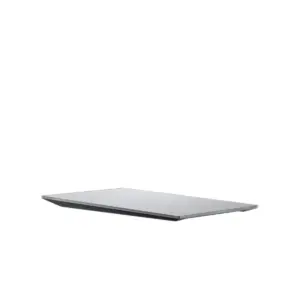
Starlink Router 4 is the next-generation indoor router introduced for newer Dual PoE Starlink hardware configurations. Its main change is a move to a Wi-Fi 7 chipset, together with a larger published coverage target, support for more associated devices, WPA3 support and a network layout designed around Ethernet and Dual PoE power. For Dubai and UAE customers, the important buying question is not simply whether “Wi-Fi 7” sounds newer. The practical question is whether Router 4 fits the exact Starlink kit, building layout, wired-network plan, firewall design and service requirement. Fourteck helps customers identify the correct hardware generation, check upgrade suitability, plan router placement, connect business networks and avoid ordering a router that does not match the power or terminal architecture already on site.
What Is Starlink Router 4?
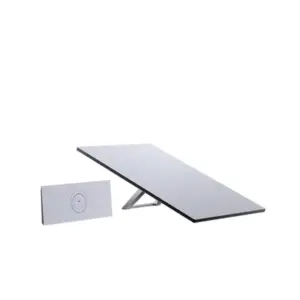
Starlink Router 4 is a newer Starlink wireless router platform intended to improve the local-network side of compatible Starlink deployments. It should not be confused with the Standard 4 terminal name, the Standard 4 X kit name, Router 3 or Router Mini. Those names describe different parts of the Starlink hardware family. Router 4 is the router itself. The satellite terminal, power supply, cables, mounting hardware and service plan remain separate decision points.
That distinction matters in Dubai because many customers already own a Starlink terminal and want only a better indoor network. Others are buying a complete new kit and assume the newest router automatically comes with every Starlink package. Hardware bundles can vary by market, generation and kit. Fourteck therefore recommends checking the exact router model, terminal model and power architecture before purchase. Availability, included accessories and supported kit combinations can change by region, so a quotation should identify the actual supplied hardware rather than relying only on a broad phrase such as “latest Starlink.”
Router 4 Is a Network Upgrade, Not an Internet-Speed Guarantee
A faster Wi-Fi router can remove an indoor networking bottleneck, but it cannot create satellite capacity that the Starlink service does not provide. Router 4 can improve wireless client capability, local device handling and coverage compared with an older router in suitable conditions. Actual internet performance still depends on the Starlink service plan, service area, satellite capacity, network congestion, obstruction conditions, terminal generation, weather, local Wi-Fi interference and the client device being used.
Controls the local Wi-Fi and Ethernet experience: radio generation, coverage, client handling, security and LAN connectivity.
Depends on terminal hardware, service plan, satellite-network conditions, priority rules and the service location.
Depends on walls, floors, RF noise, router position, access points, cabling and the number and type of active devices.
Starlink Router 4 Specifications for Planning
The following published characteristics are useful for network and installation planning. They should be treated as hardware-capability figures, not guaranteed real-world coverage, user capacity or internet throughput. Final hardware supplied in a specific country or kit should be confirmed before ordering.
| Wireless generation | Wi-Fi 7 chipset / IEEE 802.11be class with backward compatibility for older Wi-Fi standards |
| Radio bands | 2.4 GHz and 5 GHz operation; do not assume a 6 GHz client radio simply because the router is marketed as Wi-Fi 7 |
| Radio design | Published information identifies 4×4 capability on 2.4 GHz and a higher-chain 5 GHz configuration, with MU-MIMO and OFDMA |
| Security | WPA2 and WPA3 support |
| Published coverage target | Up to approximately 325 m² / 3,500 ft² under suitable conditions |
| Published associated-device target | Up to 510 connected devices; this is not a guarantee of good performance for 510 simultaneously active high-bandwidth users |
| Ethernet | Two Ethernet interfaces in the Router 4 hardware design, with exact WAN/LAN roles tied to supported Dual PoE kit architecture |
| Environmental profile | IP56-class water resistance is reported for the enclosure, while the router is intended for protected indoor deployment |
| Operating temperature | Approximately -30°C to 50°C in published material |
| Approximate size | About 46 × 203 × 115 mm |
| Approximate weight | About 0.4 kg |
| Power architecture | Designed for supported Dual PoE configurations; verify the correct power supply and cable path before using Router 4 with an existing Starlink installation |
Wi-Fi 7: What Dubai Buyers Should Actually Expect
Wi-Fi 7 is the headline feature, but the label alone does not tell the whole story. A Wi-Fi 7 client can benefit from newer radio features and faster local links when the router, spectrum and client all support the same capabilities. However, Router 4 should not be judged against a premium 6 GHz enterprise access point simply because both use the words “Wi-Fi 7.” Early regulatory information for Router 4 identifies 2.4 GHz and 5 GHz operation, so buyers should not assume that 6 GHz operation or every optional Wi-Fi 7 feature is available in every region or firmware version.
For practical Starlink use, the biggest benefits may be improved client capacity, a stronger local wireless platform, newer security support and a larger stated coverage target. Whether those benefits are noticeable depends on the building. A small office with ten ordinary laptops may see little difference if Router 3 already covers the space well. A larger villa, busy project office or device-heavy environment may benefit more. A warehouse, school, hotel or multi-floor office may still need dedicated access points because one central router cannot overcome every concrete wall, metal rack or floor slab.
Router 4 vs Router 3 vs Router Mini
The correct comparison starts with the existing Starlink hardware and the indoor-network requirement. Router 4 is not automatically required for every site, and an older router does not become unusable because a newer model exists.
| Decision factor | Router 4 | Router 3 | Router Mini |
|---|---|---|---|
| Wi-Fi generation | Wi-Fi 7 class | Wi-Fi 6 | Wi-Fi 6 |
| Coverage direction | Largest published target of the three | Strong all-round home/small-business coverage | Compact coverage profile |
| Best reason to choose | New build, supported upgrade, larger Wi-Fi requirement, newer clients | Existing compatible Standard kit with adequate Wi-Fi | Compact kit or site using separate LAN/Wi-Fi infrastructure |
| Main warning | Check Dual PoE/power compatibility and regional availability | Do not upgrade only for a model-number change if coverage is already good | May need additional network equipment for larger buildings |
For complete kit comparisons, see Fourteck’s Starlink Standard 4 Dubai and Starlink Standard 4 X Dubai pages. Those pages focus on terminal-and-router bundles; this Router 4 page focuses on the router itself, upgrade planning and LAN design.
Check Power Architecture Before Treating Router 4 as a Drop-In Replacement
The most important technical check before a Router 4 upgrade is the power and Ethernet path. Router 4 is associated with newer Dual PoE Starlink arrangements rather than a generic wall-powered consumer-router design. That means a customer should not assume that an existing Router 2 or Router 3 can be unplugged and replaced with Router 4 using the same cable and power supply without verification.
Before ordering, identify the terminal model, current router, power supply, cable type and how Starlink is connected to the local network. If the site has a Standard 4 configuration with Router Mini and Dual PoE, the upgrade path may be materially different from a Standard 4 X kit using Router 3. The same principle applies to Starlink Mini, Performance-family hardware and older generations.
Business Network Integration Beyond the Router
A business Starlink deployment should be planned as a complete path rather than a single router purchase. The terminal requires the correct service, mounting and sky view. The power path must match the hardware. Router 4 can provide local Wi-Fi and Ethernet. A firewall or SD-WAN appliance may then handle automatic failover, VPN, security policy and traffic control. Managed switching can support wired computers, phones, cameras, printers and additional access points.
For a small office, Router 4 may be sufficient as the primary local network. For a warehouse, school, hotel, multi-floor office or branch with VLANs and security requirements, the better design may be to treat Starlink as a WAN source feeding dedicated business networking equipment. Fourteck can help decide whether Router 4 should remain the main router, act as part of the Starlink path or sit alongside a separate firewall and Wi-Fi system.
When Router 4 Makes Sense
A new site can be designed around the latest supported power, router and network architecture from the beginning.
Router 4 can be considered when the older router is the real bottleneck and a supported upgrade path is available.
Device-heavy homes, offices and temporary facilities may value the higher published associated-device capacity.
Router 4 can be evaluated alongside switching, firewall, access-point and backup-power upgrades instead of as an isolated purchase.
When You May Not Need Router 4
An upgrade is not automatically necessary when an existing Router 3 already gives stable coverage and the site has no client-capacity problem. Replacing functioning hardware only because a newer model exists can add cost without fixing the actual issue. Poor Starlink performance may come from terminal obstruction, service congestion, incorrect mounting, weak satellite visibility, poor client Wi-Fi capability or an overloaded downstream network rather than the router model.
Similarly, a large commercial facility may get better results by using a dedicated firewall, managed switch and multiple ceiling access points instead of expecting a single Router 4 to cover every department. The router can still be part of the Starlink path, but professional Wi-Fi design should be based on floor area, wall construction, user density, roaming requirements and application load.
Dubai Villa and Residential Use
In a Dubai villa, Router 4 can be useful when Starlink is used as primary internet, backup internet or a separate connection for a home office. The router should be positioned near the occupied area rather than hidden in a roof cabinet simply because the satellite cable enters there. Concrete walls, reinforced floors, stair cores, mirrored surfaces and utility rooms can reduce Wi-Fi coverage significantly.
A multi-floor villa may still need a mesh node or structured Wi-Fi system even when the router’s published coverage figure appears large enough on paper. The square-foot figure is a capability target, not a promise that the signal will pass through every slab and wall. Fourteck can help decide whether Router 4 alone is sufficient or whether the Starlink connection should feed a broader home network.
Construction, Remote Site and Temporary Office Use
Construction sites and temporary offices often have different priorities from homes. The network may serve laptops, mobile devices, CCTV cameras, access-control systems, printers, site-management applications, cloud storage and video meetings at the same time. Router 4’s newer Wi-Fi platform can help the local network, but the complete design should include protected equipment placement, stable power, cable protection and a plan for coverage across cabins or separate structures.
For remote sites, power resilience is frequently more important than peak Wi-Fi capability. If the Starlink terminal, Dual PoE supply and Router 4 lose power during a generator changeover, the site loses connectivity regardless of router generation. Customers that need a full deployment can review the Starlink Internet Installation Service Dubai and Starlink Site Survey Service Dubai.
Router Placement Checklist
Use a protected, ventilated indoor position even when the enclosure has a water-resistance rating.
Place the router near the actual user area when it is expected to provide building Wi-Fi.
Metal cabinets and plant rooms can reduce wireless coverage dramatically.
The best router location must also work with the approved Starlink power and Ethernet path.
Do not leave networking equipment in an unventilated rooftop or outdoor cabinet exposed to Dubai summer heat.
Validate Wi-Fi coverage and wired links before finalizing the permanent position.
Starlink Router 4 Dubai Buying Checklist
A correct quotation depends on more than the router name. Share the existing terminal model, current router, power supply or PoE arrangement, site type, number of active users, wired-device requirement, firewall or failover requirement and required coverage area. Those details help Fourteck distinguish a simple hardware request from a complete network-upgrade project.
Customers should also confirm regional availability. Router 4 rollout, bundle contents, accessories and supply can vary by country and time. Fourteck does not treat an international product announcement as proof of immediate UAE stock or activation eligibility. The exact hardware, quantity, lead time, compatible kit and service requirement should be confirmed at quotation stage.
Dubai and UAE Availability: Confirm Before Ordering
Router 4 has been introduced as a newer Starlink router platform, but availability can be selective and may not match every country, kit or sales channel at the same time. Customers should confirm the exact hardware, quantity, lead time, accessories and compatible Starlink kit before placing an order.
This is especially important for project work. A construction deployment, remote branch or business-continuity design should not be built around an assumed router model if the actual kit supplied uses a different router. Fourteck can prepare the network design around the confirmed bill of materials and suggest an alternative architecture when Router 4 is not yet the correct fit for the target site.
Support Across Dubai, Abu Dhabi, Sharjah and the UAE
Fourteck supports Starlink hardware and network-planning enquiries for Dubai, Abu Dhabi, Sharjah, Ajman, Ras Al Khaimah, Fujairah and other UAE locations subject to project scope and service suitability. The requirement can be as simple as identifying the correct Router 4 hardware or as broad as planning a complete Starlink deployment with site survey, mounting, power backup, structured cabling, firewall integration, switching and Wi-Fi coverage.
Customers operating across the wider Fourteck network can also request region-specific procurement and deployment guidance for supported projects. Hardware availability, service rules, electrical conditions and installation environments differ by country, so the same router should not be copied into every design without a local requirement check.
Frequently Asked Questions About Starlink Router 4 Dubai
Is Starlink Router 4 a Wi-Fi 7 router?
Yes. Router 4 has been introduced with a Wi-Fi 7 / IEEE 802.11be-class chipset. Actual client performance still depends on supported bands, firmware, the client device and local RF conditions.
Does Router 4 use 6 GHz Wi-Fi?
Do not assume 6 GHz simply because Router 4 is described as Wi-Fi 7. Early published and regulatory information identifies 2.4 GHz and 5 GHz operation for the hardware. Confirm the final regional specification before designing around a 6 GHz requirement.
How much area can Router 4 cover?
Published material describes coverage up to about 325 m² or 3,500 ft² under suitable conditions. Real coverage can be much lower in villas, offices or warehouses with concrete, metal, multiple floors or heavy interference.
Can Router 4 support 510 devices?
The published associated-device figure is up to 510. It should not be interpreted as a guarantee that 510 simultaneous high-bandwidth users will receive good application performance. WAN capacity, client behavior, Wi-Fi airtime and network design still matter.
Is Router 4 the same as Starlink Standard 4?
No. Router 4 is a router model. Starlink Standard 4 is a kit and terminal naming context. A Standard 4 bundle can have a different included router depending on the exact configuration, so always check the box contents and power architecture.
Can I replace Router 3 with Router 4?
Possibly, but do not assume it is a direct one-cable swap. Router 4 is associated with Dual PoE hardware architecture. Confirm terminal generation, current power supply, cables, supported upgrade hardware and regional availability first.
Can Router 4 work with a business firewall?
A business Starlink deployment can be integrated with firewall, multi-WAN, switching and access-point infrastructure when the topology is planned correctly. The exact connection method and supported operating mode should be checked for the current hardware and firmware.
Is Starlink Router 4 available in Dubai now?
Availability can vary by country, kit and sales channel. Confirm current UAE supply, included accessories and supported hardware combination before ordering rather than relying on an international launch announcement.
Does Router 4 make Starlink internet faster?
It can improve the local Wi-Fi side when an older router is the bottleneck, but it does not guarantee a higher satellite internet speed. Starlink WAN performance remains dependent on plan, terminal, service area, congestion, obstruction and network conditions.
Can Fourteck help install and configure Router 4?
Fourteck can help with hardware identification, compatibility checks, router placement, Starlink installation planning, network integration, firewall/failover design and wider Wi-Fi requirements in Dubai and the UAE.
Request a Starlink Router 4 Dubai Compatibility Check
Send Fourteck your current Starlink terminal model, router model, power-supply details, site type and network requirement. We can help determine whether Router 4 is the correct upgrade, whether additional power or cabling hardware is required, and whether the site would benefit more from Router 4 alone, Starlink mesh, or a complete firewall/switch/access-point design. Availability, pricing, service eligibility and exact bundle contents are confirmed at quotation time.

Reviews
There are no reviews yet.