Starlink Standard 4 X Dubai
Starlink Standard 4 X Dubai is the current name for the Starlink Standard Kit supplied with the rectangular Standard terminal, kickstand, Router 3, 15 m Starlink cable, AC power cable and separate power supply. The naming matters because Starlink now distinguishes Standard 4 X from Standard 4: Standard 4 X uses Router 3, while Standard 4 uses Router Mini and a different power arrangement. Fourteck helps Dubai and UAE buyers identify the right bundle, confirm the intended deployment, plan sky visibility and mounting, design indoor Wi-Fi or wired networking, and prepare the site before procurement.
594 × 383 × 39.7 mm terminal
110° field of view
IP67 Type 4 terminal
Homes, villas, offices, project cabins, farms, warehouses, temporary facilities and business backup designs that need the Standard terminal with Router 3.
Router 3 provides tri-band Wi-Fi 6, two latching Ethernet LAN ports and a broader indoor Wi-Fi profile than the compact Router Mini bundle.
Service eligibility, plan choice and actual network performance are location and plan dependent. Confirm the intended use before ordering or installing hardware.
First, Identify the Correct Starlink Standard Bundle
Starlink has simplified the names used for its Standard kits. The hardware previously sold and discussed as the Starlink Standard Kit is now called Standard 4 X. The separate bundle that combines the same general Standard terminal family with Router Mini is called Standard 4. Buyers in Dubai may still see older descriptions such as Standard Kit, Gen 3, V4, Standard V4 or Standard Gen 3 on quotations and marketplace listings. Those labels can be ambiguous, so Fourteck recommends checking the router, power supply and exact box contents rather than relying on a shorthand product title.
For a Standard 4 X purchase, the easiest visual and specification check is the router: the kit includes the wider Router 3. If the bundle includes the smaller Router Mini and a Dual PoE power supply, it is the newer Standard 4 bundle instead. This distinction affects indoor wireless coverage, power layout, mounting accessories, spare-part planning and how the Starlink connection is integrated into an office or site network.
Standard 4 X vs Standard 4: What Changes for a Dubai Buyer?
| Decision point | Standard 4 X | Standard 4 |
|---|---|---|
| Router | Router 3 | Router Mini |
| Wi-Fi profile | Tri-band Wi-Fi 6, 4 × 4 MU-MIMO | Compact dual-band Wi-Fi 6 design |
| Power layout | Separate power supply used with Router 3 | Dual PoE power supply used with Router Mini |
| Indoor network focus | Good starting point when stronger built-in Wi-Fi and wired LAN access are priorities | Compact option for smaller spaces or deployments that will use separate networking |
| Fourteck reference | This refreshed product page | Starlink Standard 4 Dubai |
Neither name by itself tells you whether a particular service plan is active or suitable at a specific address. Hardware choice and service eligibility should be treated as separate checks. Fourteck can help clarify the equipment package and deployment requirement before the customer commits to mounting, structured cabling or network changes.
What Comes in the Starlink Standard 4 X Kit?
The Standard 4 X package is a complete starting hardware bundle rather than only a satellite antenna. Current manufacturer documentation lists the Standard terminal, kickstand, Router 3, a 15 m Starlink cable, a 1.5 m AC power cable and the separate power supply. The complete package is listed at approximately 6.73 kg with package dimensions of about 652.4 × 451.7 × 97.9 mm. These physical details matter when the kit is being shipped to a project site, stored as backup equipment or carried between temporary locations.
Electronic phased-array antenna designed for software-assisted manual orientation. A clear view of the sky remains essential.
Useful for initial placement and temporary deployment. Permanent Dubai installations normally deserve a site-appropriate fixed mounting plan.
Tri-band Wi-Fi 6 router with two latching Ethernet LAN ports for local devices or downstream network equipment.
Creates practical separation between the outdoor terminal position and the indoor network/power location. The cable route should be protected and serviceable.
Connects the kit power system to the site supply. Remote locations should consider surge protection, backup power and safe electrical placement.
Separate power unit used by the Standard 4 X architecture. Its placement should remain accessible and protected from inappropriate exposure.
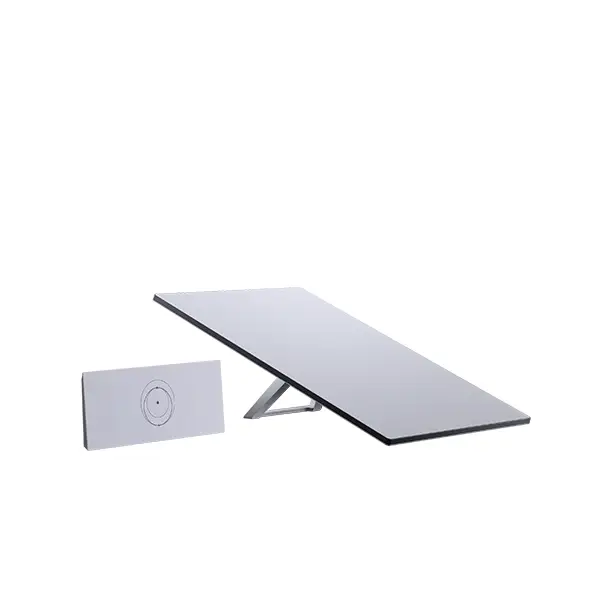
Verified Standard Terminal Specifications
Hardware specifications help with installation design, transport and environmental planning. They should not be read as a guaranteed internet speed or service promise. Actual Starlink performance varies with service plan, location, network load, obstructions, weather and other operating conditions.
| Antenna type | Electronic phased array |
| Dimensions | 594 × 383 × 39.7 mm |
| Field of view | 110° |
| Orientation | Software-assisted manual orienting |
| Weight | 2.9 kg terminal; about 3.2 kg with kickstand; about 3.8 kg with kickstand and 15 m cable |
| Environmental rating | IP67 Type 4 |
| Operating temperature | -30°C to 50°C |
| Operational wind specification | 96 kph+ |
| Snow melt capability | Up to 40 mm/hour |
| Average power consumption | 75–100 W for the Standard hardware family under manufacturer test conditions; actual use varies |
Router 3: Why It Is the Main Buying Difference
For many Dubai customers, the most practical reason to choose Standard 4 X over Standard 4 is the included Router 3. Manufacturer specifications list Router 3 as a Wi-Fi 6 device using tri-band 4 × 4 MU-MIMO radios, with two latching Ethernet LAN ports and stated Wi-Fi coverage of up to 297 m² under suitable conditions. The specification also lists support for up to 235 connected devices. Those figures are product capabilities, not promises that a large villa, warehouse or office will receive perfect signal in every room. Concrete walls, metal shelving, floor separation, plant rooms, server rooms and the location of the router can reduce real coverage significantly.
Router 3 is listed as water resistant to IP56 but configured for indoor use. In Dubai projects, that means the router should normally be positioned in an indoor or properly protected technical area, not left on a roof, exposed balcony or open site structure simply because the antenna is outdoors. If the Starlink terminal must be positioned far from the main office, the design should consider where the power supply and Router 3 will terminate and how the local LAN will continue from there.
The two Ethernet LAN ports are useful for integrating switches, workstations, CCTV recorders, firewalls or other network devices where the chosen topology supports them. Starlink’s own mesh compatibility for Router 3 is different from simply connecting downstream networking equipment, so customers planning complex Wi-Fi coverage should define the architecture before buying extra devices.
Who Should Consider Starlink Standard 4 X in Dubai?
Suitable for customers who want the Standard terminal and prefer Router 3 as the primary indoor Wi-Fi device. Larger homes may still need additional access points or planned mesh coverage.
Useful where a temporary office needs internet before fixed infrastructure is ready, subject to service eligibility and an obstruction-free installation position.
Can provide an internet path for office systems, tracking, cloud applications and monitoring. Wi-Fi throughout a warehouse normally requires separate coverage design.
A possible connectivity option when terrestrial services are weak or delayed. Power stability, mounting security, cable protection and remote support become especially important.
Can be considered as an alternate WAN path when used with an appropriate router or firewall design. Failover behavior and application requirements should be tested rather than assumed.
Useful for short-term sites that can provide safe power, clear sky and secure equipment placement. Portable use still requires service-plan and use-case compatibility checks.
Dubai Installation Planning: What Matters Before the Box Is Opened?
The quality of a Starlink deployment depends heavily on where and how the terminal is installed. Standard 4 X uses software-assisted manual orientation, so the terminal should be positioned where the required sky view is not blocked by parapet walls, neighboring buildings, trees, sign structures, tanks or rooftop mechanical equipment. A convenient mounting point is not always a good satellite location. Fourteck recommends checking the sky view first, then designing the cable route and indoor termination around the best practical antenna position.
Dubai roofs and external spaces can introduce heat, dust, UV exposure, wind loading and maintenance-access constraints. The Standard terminal has an outdoor environmental rating, but the full installation includes other components that should not be treated as though every part has the same exposure tolerance. The mounting surface, fasteners, cable entry, drip management and indoor equipment location need to be selected as a system. A temporary kickstand can help during testing, while a long-term roof or pole installation should be mechanically secure and serviceable.
For buyers who want professional planning, Fourteck provides a dedicated Starlink site survey service in Dubai and Starlink installation support. These pages focus on obstruction review, mounting approach, cable routing, power access, router placement and commissioning rather than only hardware supply.
Roof, Pole or Temporary Placement?
Roof placement can provide strong sky visibility, but the installer should consider access safety, membrane protection, parapet obstruction, wind exposure and the route from the roof into the building. A roof is not automatically the best place if a nearby wall or mechanical structure blocks the terminal’s field of view. Customers planning a roof installation can review Fourteck’s Starlink roof mount installation guidance.
Pole mounting may be useful when the terminal needs to be raised above local obstruction or positioned away from a busy roof surface. The pole, base, brackets and fixing method must be appropriate for the location and expected wind exposure. The cable should be supported so that it is not carrying mechanical load. Fourteck also provides information on Starlink pole mount installation in Dubai.
Temporary kickstand placement is useful for commissioning, testing or short-duration operation in a protected area. It should not become an accidental permanent installation where the terminal can be moved, hit, buried in sand, exposed to vehicle traffic or placed where cable connectors are repeatedly stressed.
Power Planning for Villas, Sites and Remote Operations
Starlink lists average Standard-family power consumption in the 75–100 W range, with actual consumption varying by temperature, location and use. A normal Dubai home may simply connect the system to an appropriate protected AC outlet, while a construction cabin, farm or remote project may need a more deliberate design. Generators, portable power stations, UPS systems and solar installations should be sized for the complete operating environment rather than only the average number on a specification sheet.
Business users should also think about what happens during a power interruption. If Starlink is being used for backup communications, CCTV visibility or remote access, the terminal, power supply, Router 3 and any downstream firewall, switch or access point all need a compatible backup-power strategy. Keeping only one component alive does not preserve end-to-end connectivity.
Network Integration Beyond the Included Router
A small villa or site office may use Router 3 directly, but many business deployments need a broader network. A typical design can include a firewall or router for policy control, a managed switch for wired devices, access points for larger Wi-Fi areas, CCTV equipment, VoIP phones, printers and cloud-managed systems. Standard 4 X gives the site an internet path; it does not replace proper LAN design when the customer has multiple rooms, VLANs, security policies or high device density.
Useful when Starlink is one of multiple WAN links and the business needs failover, policy routing, VPN or security inspection.
Appropriate for offices, warehouses and sites with wired endpoints, cameras, access points or segmented networks.
Large villas and commercial spaces may require extra access points or supported mesh design because walls and layout determine real coverage.
Camera count, cloud recording method, upload demand and remote-access design should be reviewed before relying on a single connection.
Standard 4 X, Mini or Performance: Which Direction Fits the Requirement?
The best Starlink hardware choice depends on the actual deployment rather than the model name alone. Standard 4 X is designed as a mainstream high-demand everyday kit with Router 3. Starlink Mini prioritizes compact size and portability, while Performance-family hardware targets more demanding operating environments and different deployment profiles. A Dubai buyer should compare terminal size, power demand, router requirements, mounting, mobility needs and service-plan compatibility before choosing.
| Requirement | Likely starting point | Why |
|---|---|---|
| Everyday home or office with Router 3 | Standard 4 X | Standard terminal plus higher-capacity Router 3 bundle |
| Compact portable requirement | Starlink Mini | Smaller terminal, integrated Wi-Fi and lower typical power demand |
| Standard terminal with compact Router Mini | Standard 4 | Same general Standard terminal class with a different router and power architecture |
| More demanding commercial or environmental requirement | Review Performance options | Hardware and operating profile may better suit specialized requirements |
Practical Dubai Deployment Scenarios
Villa backup internet
A villa may use Standard 4 X as a separate internet path for continuity when the primary service is unavailable. The best design depends on whether the user wants manual switching, automatic failover or only emergency Wi-Fi. Router 3 can serve as the local Wi-Fi device, or the Starlink path can be integrated into a wider home network when planned correctly.
Construction site office
A project cabin may need email, cloud documents, video meetings, reporting systems and remote access before fibre or fixed wireless is ready. The installation should protect the terminal and cable from equipment movement, temporary works and site traffic. If the cabin moves during the project, the service and hardware plan should be reviewed before relocation.
Warehouse or logistics yard
A warehouse can use Starlink for office connectivity, cloud systems and backup access, but Router 3 alone may not cover the entire building. Metal racking, insulated panels and long floor areas often require dedicated wireless design. The satellite terminal should be treated as the WAN source while the internal LAN is engineered for the facility.
Remote farm or desert operation
Remote sites often need more attention to power reliability, dust exposure, secure mounting, surge protection and remote troubleshooting. A clean open-sky location may be easier to find than in dense urban areas, but physical protection becomes more important. Fourteck can help define the bill of materials around the actual site rather than assuming the boxed kit is the whole solution.
Procurement Checklist Before You Request a Starlink Standard 4 X Dubai Quote
A useful quotation starts with the operating requirement. Sharing the details below helps Fourteck distinguish a simple hardware request from a complete installation, network or business-continuity project.
Dubai area, roof/site type and whether the installation is permanent or temporary.
Home internet, office, construction, CCTV, backup WAN, remote operations or another requirement.
Approximate simultaneous users, workstations, phones, cameras and other connected devices.
One room, villa, office floor, warehouse, staff accommodation or multi-building layout.
Roof, pole, wall, temporary ground placement or unknown pending survey.
Whether Starlink will connect directly to Router 3 or into an existing firewall, switch and access-point network.
Normal utility power, generator, UPS, solar or a mixed remote-power setup.
Confirm the intended plan and service eligibility for the location before assuming activation or performance.
Fourteck Support Across Dubai and the UAE
Fourteck supports Starlink hardware and deployment enquiries for Dubai customers who need product selection, site planning, mounting guidance, network integration and procurement assistance. Typical requests come from villas, business offices, construction projects, logistics companies, hospitality sites, farms, remote compounds and organizations building a backup internet path. Requirements can also extend into Abu Dhabi, Sharjah, Ajman, Ras Al Khaimah, Fujairah and other UAE locations where the installation and service conditions are suitable.
The goal is to match the hardware and supporting network design to the actual requirement. A buyer who only needs a Standard 4 X kit has a different scope from a business that needs a roof survey, permanent mount, firewall failover, structured cabling and managed Wi-Fi. Separating those needs at the quotation stage reduces unnecessary equipment and avoids discovering installation constraints after purchase.
Frequently Asked Questions About Starlink Standard 4 X Dubai
Yes. Starlink renamed the Standard Kit to Standard 4 X. The Standard 4 X bundle includes Router 3.
Standard 4 X uses Router 3 and a separate power-supply architecture. Standard 4 uses Router Mini with a Dual PoE power supply. Confirm the included router before ordering.
Yes. The kit includes Router 3, a tri-band Wi-Fi 6 router with two latching Ethernet LAN ports.
Manufacturer specifications list coverage up to 297 m² under suitable conditions, but real coverage depends on walls, floors, layout and interference. Large sites may require extra access points or a planned mesh/network design.
Yes. Obstruction can affect service stability. The terminal should be placed where nearby structures, trees and rooftop equipment do not block the required sky view.
Fourteck can assist with site-survey and installation planning, including mounting approach, cable routing, indoor router position and network-integration requirements.
It can be considered as an alternate WAN path where service eligibility and network design are appropriate. Automatic failover normally requires a compatible firewall or router and should be tested with the business applications.
Starlink lists average Standard-family power use at 75–100 W, with actual consumption varying by temperature, location and utilization. Remote sites should size backup power for all networking equipment, not only the terminal.
The Router 3 specification lists IP56 water resistance but says it is configured for indoor use. It should be placed in a suitable protected indoor location.
The Router 3 provides Ethernet LAN connectivity, and business networks can be designed around the Starlink WAN path. The exact topology should be reviewed before deployment, especially for failover, VPN, VLAN or CCTV requirements.
They serve different priorities. Standard 4 X is aimed at higher-demand everyday use and includes Router 3. Mini prioritizes compact size, portability and lower typical power demand.
Confirm current service eligibility and plan suitability for the intended location and use before ordering. Hardware supply alone does not prove that a particular service plan is available or appropriate.
Request Starlink Standard 4 X Dubai Support
Tell Fourteck where the kit will be used, whether the requirement is hardware-only or includes installation, and whether Starlink must connect into an existing firewall, switch, Wi-Fi or backup-WAN environment. We can help you identify the correct Standard 4 X bundle, plan the site and prepare a practical quotation without assuming service eligibility or performance.


Reviews
There are no reviews yet.