
Starlink V5 Standard Dish Dubai
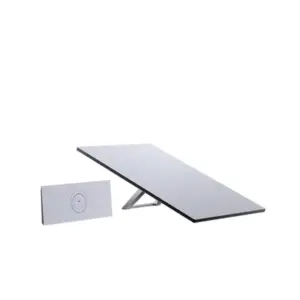
Starlink V5 Standard Dish Dubai is a buyer-focused name for Starlink’s V5 kit, the next-generation compact fixed-site Starlink hardware for customers who want reliable satellite internet with a smaller terminal, substantially lower average power demand and easier physical installation than the preceding V4-class Standard hardware. Starlink publishes the V5 terminal at 384 × 306 × 34 mm, 1.1 kg and an average power range of 35–50 W, compared with 594 × 383 × 39.7 mm, 2.9 kg and 75–100 W for Starlink V4. The kit is designed for home internet and fixed deployments rather than in-motion use, so Dubai and UAE buyers should evaluate it as a lightweight residential, villa, remote-office, project-site or backup-connectivity terminal—not as a replacement for Starlink Mini travel use or specialist mobility hardware.
Fourteck helps buyers translate those hardware changes into practical decisions about mounting, power, router placement, Ethernet handoff, Wi-Fi coverage, obstruction clearance, UPS sizing and integration with business firewalls or access points. V5 availability, kit ordering and service-plan eligibility can vary by market and service address, so buyers should confirm current eligibility before purchase or deployment.
Is Starlink V5 the New Standard Dish?
Starlink V5 is Starlink’s official current product name for this next-generation home-internet terminal. Buyers may search for it as the Starlink V5 Standard Dish because it follows the V4/Standard-class fixed-site hardware family, but “Standard Dish” should be treated as a practical buying phrase rather than a separate official model name. For Dubai and UAE procurement, the important step is to confirm that the quotation and kit label identify Starlink V5, not Standard 4, Standard 4 X, Mini or a Performance terminal.
The V5 terminal is substantially smaller and lighter than V4 and has a lower published average power range. Starlink states a peak hardware download capability of 375+ Mbps, while also making clear that real service performance depends on plan selection, location, network conditions and availability. V5 is designed for fixed home-internet use and is not intended for in-motion operation.
You want the newer compact fixed-site terminal, lower published average power demand, Router Mini bundle and included pipe adapter for a home, villa, office or remote fixed location.
Your project is based on the larger V4-class Standard terminal or you need to distinguish the Router Mini-based Standard 4 bundle from the Router 3-based Standard 4 X bundle.
Mounting, sky visibility, cable route, indoor Wi-Fi, power backup, service-plan eligibility and whether the site is fixed or mobile remain part of the buying decision.
What Starlink V5 Is—and What It Is Not
The most important buying decision is to identify the product class correctly. Starlink V5 is positioned by Starlink as its next-generation home internet kit. It is not simply a new name for Standard 4, and it is not the same product as Starlink Mini. The smaller body can make V5 look like a mobility-focused terminal at first glance, but Starlink explicitly states that V5 is not intended for in-motion use. That distinction matters for UAE customers evaluating equipment for vehicles, boats, temporary travel setups, moving work crews or fixed premises.
For a villa, remote property, fixed construction office, desert site cabin, branch office or backup internet point, V5 can be attractive because the terminal is easier to handle and has a lower published power range than the V4-class Standard unit. For travel or highly portable deployments, the Starlink Mini Kit Dubai remains a separate product decision. For industrial, specialist business or more demanding service requirements, the Starlink Performance Kit Dubai may be more appropriate depending on the project.
choose V5 because its fixed-site form factor, power profile, kit contents and installation model fit the project—not merely because it is the newest hardware.
Starlink V5 vs V4: The Hardware Changes That Matter
V5 is best understood by comparing the installation variables rather than looking only at the generation number. Starlink’s own comparison shows that V5 is significantly smaller and lighter, with a lower average power range. The published peak hardware download figure is 375+ Mbps for V5 versus 400+ Mbps for V4. That does not mean V5 is a slower real-world service choice in every situation, because Starlink itself qualifies these as peak hardware figures; actual performance depends on plan, service availability, network conditions, congestion and other operating factors.
| Decision point | Starlink V4 / Standard-class terminal | Starlink V5 |
|---|---|---|
| Published dimensions | 594 × 383 × 39.7 mm | 384 × 306 × 34 mm |
| Published weight | 2.9 kg | 1.1 kg |
| Average power | 75–100 W | 35–50 W |
| Peak hardware download figure | 400+ Mbps | 375+ Mbps |
| Router compatibility | Router 2, Router 3 and Router Mini | Router 2, Router 3 and Router Mini |
| V5 buying advantage | Larger established Standard hardware footprint | Lower mass, smaller mounting footprint and lower published power draw |
For Dubai and UAE projects, lower power can be as important as terminal size. It can reduce the continuous load placed on a UPS, battery bank, inverter or solar-backed system. A smaller terminal can also simplify rooftop handling and reduce the physical space needed at a mounting point. Those advantages are practical, but they still need to be balanced against clear-sky visibility, safe mounting, cable routing and the building’s Wi-Fi design.
What Comes in the Starlink V5 Kit?
Starlink’s current V5 setup documentation lists the terminal, a kickstand, a pipe adapter mount, Router Mini with stand, a 15 m Starlink cable, a 1.5 m AC cable and a 2 m Ethernet cable. The inclusion of a pipe adapter is especially relevant for buyers who want a more permanent installation path instead of leaving the terminal on its kickstand. The supplied package is still only the starting point for many Dubai projects; roof work, longer cable runs, electrical protection, structured cabling, additional Wi-Fi or a business firewall can require extra planning.
Compact electronic phased-array satellite terminal designed for fixed home internet use.
Useful for initial placement, testing and supported temporary surface deployment.
Provides a path toward a more permanent pole or pipe-based mounting arrangement.
Compact indoor Wi-Fi 6 router included with the V5 home kit.
Main kit cable that should be planned before finalizing the terminal and indoor equipment positions.
Supports the network path between the supplied components and helps simplify initial setup.
Requires a suitable protected power point close to the indoor termination equipment.
Router Mini: Compact Wi-Fi Is Useful, but It Is Not the Whole Network
V5 includes Router Mini. Starlink publishes Router Mini as dual-band Wi-Fi 6 operating on 2.4 GHz and 5 GHz, with MU-MIMO support and WPA2 security. It is configured for indoor use. For a villa room, small office or compact accommodation unit, that may be enough to create a simple wireless network. For a multi-floor villa, warehouse, large office, hotel, staff accommodation, industrial facility or a site with reinforced concrete and metal partitions, the satellite terminal and the indoor Wi-Fi design should be treated as two separate engineering decisions.
A customer can have an excellent clear-sky terminal position and still experience poor user Wi-Fi if the Router Mini is placed in a communications cupboard, hidden behind dense walls or expected to cover a large building alone. Business buyers may prefer to hand the Starlink connection to a firewall, managed switch and multiple wireless access points. In that design, Router Mini can remain part of the supported Starlink equipment path while the business LAN is designed around actual coverage and security needs.
The right approach is requirement-led: count occupied rooms and floors, note wall materials, identify wired endpoints, list critical applications and determine whether Starlink is primary internet, a backup circuit or a remote-site link. Fourteck can then separate satellite hardware from the internal network bill of materials instead of treating one small router as a complete enterprise network.
Lower Power Consumption Changes Remote-Site Planning
The move from a published 75–100 W average range on V4 to 35–50 W on V5 is one of the strongest practical reasons to evaluate the new hardware for off-grid or backup-powered fixed sites. A satellite terminal is often only one part of the power load. The complete system may also include Router Mini, a firewall, switch, Wi-Fi access points, CCTV equipment, VoIP phones, a small server or monitoring gateway. Lower terminal demand leaves more capacity for those devices or can reduce the size of the battery and inverter system needed to reach a required runtime.
For Dubai construction projects, desert facilities and temporary offices, a UPS can protect against short interruptions and power quality problems. For more remote locations, a battery or solar-backed design needs a proper energy budget. Do not size a battery from the Starlink terminal figure alone. Add the continuous and peak requirements of all network equipment, include conversion losses, decide the required backup duration and allow a sensible engineering margin.
A lower-power terminal also reduces waste heat in small equipment spaces, but indoor equipment still needs sensible ventilation and protection from harsh site conditions. The V5 form factor improves the starting point; the quality of the finished installation still depends on the complete electrical and network design.
Clear Sky Still Matters More Than the Generation Number
V5 is smaller, but the basic satellite-site rule does not change: the terminal needs a suitable view of the sky. Starlink provides an obstruction-checking tool in the Starlink app and recommends checking the exact planned mounting location and height before permanent installation. The tool accounts for the field of view of the selected hardware. That is more useful than assuming a rooftop is automatically acceptable because it looks open from ground level.
Dubai rooftops can contain parapets, water tanks, HVAC units, advertising structures, antenna masts, neighboring towers and construction cranes. Villas can have architectural screens, trees and adjacent buildings. Project sites can change as cranes, cabins and temporary structures move. These obstructions can interrupt the satellite path even when the terminal has been installed securely.
A permanent installation should balance sky visibility, safe access, mounting integrity, cable length, future maintenance and the indoor termination point. Fourteck can structure this through a Starlink Site Survey Service Dubai when the project needs more than a simple self-installation.
Mounting Starlink V5 on Villas, Offices and Project Sites
The V5 kit includes both a kickstand and a pipe adapter. That gives buyers two different installation directions from the start. The kickstand is useful for initial testing and suitable temporary placement. A pipe adapter supports a more permanent installation where a compatible pole or pipe location provides the right sky view and mechanical support. The smaller 1.1 kg terminal can simplify handling, but permanent rooftop work still needs attention to the structure, fasteners, water ingress, wind exposure and safe maintenance access.
Do not assume that a mount advertised for V4 or another Starlink generation is automatically compatible with V5. Hardware generations can use different mechanical interfaces and accessory families. Build the mounting list from the exact V5 kit and the chosen installation method. If a customer already has a previous Starlink mount, verify the adapter requirement before planning to reuse it.
For roof installations, Fourteck can also align the terminal project with Starlink Roof Mount Installation Dubai or Starlink Pole Mount Installation Dubai depending on the structure and site requirement.
A Practical Starlink V5 Dubai Installation Workflow
Decide whether V5 will serve a home, branch office, project cabin, fixed remote site or backup link. Do not use a fixed-site assumption for a mobility requirement.
Verify the current Starlink plan and address-level position for the intended UAE location. Hardware visibility in the shop does not replace account checks.
Use the Starlink app at the actual planned mounting height and location before committing to drilling or permanent cabling.
Choose kickstand, pipe adapter or another verified V5-compatible installation approach based on permanence, exposure and safe access.
Measure the path before installation. Avoid crushed cables, sharp bends, unprotected penetrations and improvised outdoor joints.
Provide a stable indoor power point and add UPS, surge protection or backup energy based on the business continuity requirement.
Do not place the router where convenient for the cable if that position is poor for users. Treat Wi-Fi coverage as a separate design step.
Validate Starlink connectivity, wired handoff, Wi-Fi coverage, business applications and failover behavior before handover.
Starlink V5 for Dubai Villas and Residential Properties
For residential users, V5’s smaller terminal and lower published power draw can make installation easier to plan than a larger V4-class dish. The typical decision is not just whether Starlink works at the address. The buyer should also decide where the terminal can see the sky, how the cable reaches the indoor equipment, where Router Mini can provide useful coverage and whether a larger Wi-Fi design is required for the property.
A villa with several floors, thick walls, an outdoor majlis, detached staff accommodation or CCTV devices around the property can exceed what one centrally placed router can cover well. In that case, Starlink can provide the WAN connection while wired or wireless access points provide the internal network. The terminal choice and the Wi-Fi architecture should not be confused.
V5 is also useful where the customer values lower continuous power demand during UPS operation. If the property is used seasonally or located in an area with weak terrestrial broadband options, a fixed satellite link can be evaluated as primary or backup connectivity. Service plan and exact availability still need to be confirmed for the real address.
Starlink V5 for Construction, Remote Offices and Temporary Facilities
Construction and project environments often need internet before fibre is ready, after a site moves, or in a location where terrestrial services are difficult to obtain. V5 can fit this requirement when the deployment is fixed at the operating point and the smaller hardware helps teams move or reinstall the system between phases. Lower average power can also reduce the burden on site UPS systems and generators.
The project should still be planned as a network rather than a dish on a roof. Site offices may need VPN access, cloud applications, CCTV backhaul, VoIP, video meetings and Wi-Fi for multiple cabins. A single Router Mini may be enough for one compact cabin, but multiple buildings or metal structures can require Ethernet, switches and extra access points. Security teams may also need a firewall between Starlink and internal systems.
When Starlink is temporary, protect the cable and mounting point so that repeated movement does not create damage. Record the equipment, power supply, mount and account ownership so the kit can be redeployed without losing track of which parts belong together.
Starlink V5 as a Business Backup Internet Path
A backup satellite circuit is useful only when the failover design has been tested. Businesses considering V5 for resilience should decide which applications must continue if the primary fibre or fixed broadband circuit fails. A firewall or dual-WAN router can monitor the primary connection and move selected traffic to Starlink. The backup policy may prioritize email, ERP, VPN, payment systems and voice while restricting high-bandwidth guest or update traffic.
V5’s lower power range can make it easier to keep the backup path alive on UPS power, but the entire failover chain must stay powered: terminal, Router Mini or handoff equipment, firewall, core switch and the access points or phones needed by staff. If only the Starlink terminal is on backup power, users may still lose service when the rest of the LAN shuts down.
For organizations evaluating this use case, the existing Starlink Business Backup Internet Dubai page covers the solution architecture. This V5 product page focuses on the hardware decision itself.
V5 vs Starlink Mini: Similar Size Direction, Different Job
A common buying mistake will be assuming that V5 replaces Mini because V5 is much smaller than the earlier V4 terminal. Starlink positions V5 as fixed home internet hardware and states that it is not intended for in-motion use. Mini is a separate compact product designed around portability and a different deployment model. The correct comparison therefore starts with how the customer will use the system, not which device is newest.
| Requirement | V5 direction | Mini direction |
|---|---|---|
| Fixed villa/home internet | Strong fit when available and supported | May work in supported plans, but portability is the stronger reason to choose it |
| Fixed remote office | Strong fit for compact low-power fixed deployment | Useful when portability or a smaller all-in-one terminal is more important |
| Travel / portable field use | Not the main product role | Designed around portable use cases, subject to plan and regional rules |
| In-motion requirement | Starlink says V5 is not intended for in-motion use | Depends on the exact Mini plan, location and supported use; verify before deployment |
| Buying priority | Fixed internet with lower power and smaller hardware than V4 | Compact portability and flexible field deployment |
V5 vs Standard 4 and Standard 4 X
Fourteck already separates the current Standard bundles because their included router packages differ. Starlink Standard 4 Dubai is based on the larger V4-class Standard terminal supplied with Router Mini. Starlink Standard Kit Dubai covers the Standard 4 X / Standard-class direction with Router 3. V5 adds another distinct decision because the terminal itself changes size, mass and power profile.
A buyer who already has Standard 4 or Standard 4 X should not assume that V5 makes the existing hardware obsolete. If the current system meets the service requirement, a hardware change may provide limited practical value unless lower power, reduced size, easier mounting or a new installation requirement is important. The newest generation is not automatically a business case for replacement.
For a new fixed-site project, V5 becomes attractive where it is orderable for the account and the smaller, lower-power hardware fits the customer’s priorities. For an upgrade decision, compare the expected operational benefit against installation changes, mount compatibility and the condition of the existing system.
Network Integration: Firewall, Ethernet, Switching and Wi-Fi
Residential customers can use the supplied Starlink network path directly. Business and multi-user sites often need more control. A firewall can provide policy enforcement, site-to-site VPN, content filtering, logging and dual-WAN failover. A managed switch can distribute wired connectivity to offices, cameras, access points and phones. Separate wireless access points can cover areas that one Router Mini cannot reach effectively.
The important design question is where Starlink ends and the customer LAN begins. Document the handoff, router mode, IP addressing, DHCP ownership, firewall policy and failover behavior. Avoid making changes during installation without recording them, because future support becomes difficult when no one knows whether routing is handled by Starlink equipment or by the business firewall.
For branch and remote-site projects, test the actual applications. Web browsing alone is not enough. Verify VPN sessions, cloud services, remote desktop, video calls, VoIP, payment terminals, CCTV access and any monitoring system that depends on stable outbound connectivity. Performance remains plan and network dependent, so the finished design should be validated under realistic traffic.
Procurement Checklist for Starlink V5 Dubai
A useful quotation starts with the real deployment. Before requesting Starlink V5 pricing or installation, collect enough information to distinguish a simple home setup from a full business project.
Dubai, Abu Dhabi, Sharjah, Ajman, Ras Al Khaimah, Fujairah, Umm Al Quwain, Al Ain or another operational site.
Home, branch, temporary office, remote site, construction cabin, backup circuit or another fixed requirement.
Confirm the current Starlink service option and whether V5 is orderable for the exact account/address.
Ground, roof, parapet, wall, pole or another location with verified V5 accessory compatibility.
Starlink app scan from the real planned height, including future construction or rooftop plant concerns.
Normal AC, UPS, generator, inverter, battery or solar requirements and target backup duration.
Router Mini only, or firewall, switches, access points, structured cabling and VLAN requirements.
VPN, cloud ERP, CCTV, voice, POS, remote desktop, video meetings or failover traffic policies.
What Affects the Total Starlink V5 Project Cost?
The base hardware price is only one component of a finished project. Total cost can be influenced by current Starlink hardware terms, the service plan, shipping, taxes, mounting, cable length, roof access, electrical work, UPS equipment, firewalls, switches, access points, installation labour, testing and post-installation support. A simple villa setup and a business failover deployment can use the same Starlink terminal while having very different project totals.
Fourteck therefore separates the hardware requirement from installation and network integration. That allows the customer to see whether the project includes only the V5 kit, a permanent mount, protected cable route, additional Wi-Fi, business firewall integration or resilience testing. It also avoids presenting one historic online price as a guaranteed Dubai price when Starlink’s hardware and service offers can change.
For broader UAE pricing and current ordering context, see Starlink Internet Price and Availability UAE. The exact V5 order position should still be checked at the time of purchase.
Common Starlink V5 Buying Mistakes to Avoid
Assuming V5 is a travel or in-motion dish: Starlink states that V5 is not intended for in-motion use. Choose hardware from the operating requirement, not from size alone.
Buying before checking the address/account: the Starlink UAE shop currently exposes V5 as a hardware category, but the exact order and service-plan position should be confirmed for the real account and service location.
Expecting 375+ Mbps as a guaranteed speed: Starlink identifies this as a peak hardware capability. Actual service depends on plan, network conditions, congestion, service availability and other variables.
Reusing a V4 mount without checking: accessory compatibility should be verified for the exact V5 mechanical interface and installation method.
Ignoring the indoor network: Router Mini is compact Wi-Fi 6 hardware, but a large building may still need extra access points, Ethernet, switching or firewall design.
Sizing backup power from the terminal alone: include the router, firewall, switches and access points that must remain online during an outage.
Dubai, Abu Dhabi, Sharjah and Wider UAE Deployment Context
Dubai
Villas, warehouses, construction sites, temporary offices and business-backup projects often have different rooftop and Wi-Fi requirements. High-rise surroundings and rooftop equipment make obstruction checks important.
Abu Dhabi
Remote industrial sites, farms, project camps and facilities outside dense urban areas can make lower power and compact fixed hardware attractive. Energy design and long-distance support may matter as much as Wi-Fi.
Sharjah and Ajman
Warehouses, workshops, accommodation buildings and villas can require separate indoor access points even when the Starlink terminal itself is easy to install.
Northern Emirates
Properties with difficult terrestrial access can benefit from a site-by-site comparison of satellite hardware, power, mounting and current service eligibility rather than relying on a city-wide assumption.
Regional Procurement for Multi-Country Organizations
Organizations operating across the UAE, Uganda, Kenya, Tanzania, Ghana, Nigeria or other Starlink markets may be attracted to V5 as a standard fixed-site terminal because of its compact size and lower power demand. The hardware can be similar while account rules, plans, taxes, logistics, local service availability and regulatory conditions differ by country. Do not assume that a kit ordered for one market can be transferred and activated in another under the same terms.
A regional IT team should maintain a simple deployment register for each site: country, service address, Starlink hardware generation, account owner, active plan, mount, power method, router/firewall design, support contact and any local procurement constraints. That prevents confusion when equipment is moved between projects or when replacement parts are needed.
Where V5 is not currently available for a particular market or account, Standard 4, Standard 4 X, Mini, Enterprise or Performance may remain the appropriate hardware path. Availability should be checked rather than inferred from a global product announcement.
When Starlink V5 Is a Strong Choice
The address is supported, the customer wants the latest fixed home hardware and the smaller terminal simplifies installation.
The site depends on UPS, battery, generator or solar power and reducing continuous network load has practical value.
A smaller and lighter terminal makes handling or mounting easier while still meeting the fixed-site requirement.
The organization needs a fixed secondary WAN and can integrate Starlink into a tested firewall/UPS design.
When Another Starlink Kit May Be Better
Portable field or travel use: evaluate Starlink Mini and the applicable plan rather than treating V5 as a mobility terminal.
In-motion use: V5 is not intended for in-motion operation. Use hardware and service specifically supported for the real mobility requirement.
Existing V4 system already meets the need: lower power and smaller size may not justify replacement if the current system is stable and the site has no new physical constraint.
Specialist business, marine or high-demand environment: compare Performance, Enterprise or application-specific hardware and plans before deciding that a home-focused V5 kit is the right class.
Why Fourteck Uses a Requirement-Led V5 Procurement Process
A satellite internet project can fail even when the correct Starlink box has been purchased. Common causes include a blocked sky view, unsuitable mount, poor cable route, weak indoor Wi-Fi, missing UPS capacity, no firewall policy or a service plan that does not match the intended use. Fourteck begins with the requirement and then decides whether V5 is the right hardware rather than forcing a new model into every project.
For a home, the process may be as simple as checking the address, sky view, mounting point and indoor Wi-Fi. For a business, it can include dual-WAN routing, firewall integration, VLANs, access points, UPS runtime, monitoring and support ownership. For a remote project site, power and physical protection can dominate the design. The V5 hardware is one component inside that larger requirement.
This approach also makes quotations easier to compare. The customer can see the Starlink kit separately from the mount, cable work, network equipment, installation and support instead of receiving one vague line item that hides the project scope.
Starlink V5 Dubai FAQs
What is Starlink V5?
Starlink V5 is Starlink’s next-generation fixed home internet terminal. Starlink describes it as smaller, lighter and more power efficient than V4. It is intended for home/fixed internet rather than in-motion use.
How large is the Starlink V5 terminal?
Starlink publishes V5 at 384 × 306 × 34 mm and 1.1 kg. That is substantially smaller and lighter than the V4-class terminal.
How much power does Starlink V5 use?
Starlink lists average V5 power consumption at 35–50 W. Real system power planning should also include Router Mini and any firewall, switch, access points or other equipment that must stay online.
Does Starlink V5 guarantee 375 Mbps?
No. Starlink presents 375+ Mbps as a peak hardware capability. Actual speeds are not guaranteed and can vary with the selected plan, availability, congestion, network conditions and other operating factors.
Can Starlink V5 be used while driving?
Starlink states that V5 is not intended for in-motion use. Customers who need portable or mobility-focused connectivity should evaluate hardware and service designed for that requirement.
What router comes with Starlink V5?
The current V5 kit documentation lists Router Mini with a stand. Router Mini is a compact dual-band Wi-Fi 6 router configured for indoor use.
What comes in the Starlink V5 kit?
Starlink lists the V5 terminal, kickstand, pipe adapter, Router Mini with stand, 15 m Starlink cable, 1.5 m AC cable and 2 m Ethernet cable. Regional package details should be confirmed at purchase.
Is Starlink V5 available in Dubai and the UAE?
Starlink’s UAE shop currently displays V5 as a personal-hardware category. Exact kit ordering, plan eligibility and address-level service availability can change, so confirm the live Starlink account and location before purchase.
Is V5 better than Starlink Standard 4?
V5 is smaller, lighter and uses less average power according to Starlink’s published comparison. Standard 4 remains a valid fixed-site option. The better choice depends on availability, mounting, power, existing hardware and the customer’s network requirement.
Do I need professional installation for V5?
Simple supported installations can be self-installed, but professional help is useful where the project involves permanent roof or pole mounting, difficult cable routes, business firewalls, large Wi-Fi coverage, backup power or a multi-site rollout.
How can I request a Starlink V5 Dubai quotation?
Share the intended UAE location, fixed-site use case, number of users, mounting preference, power/UPS requirement and whether you need installation, firewall, Ethernet or additional Wi-Fi. Fourteck can then structure the hardware and project scope before pricing.
Request a Starlink V5 Dubai Procurement Review
Send Fourteck the service location, intended fixed-site use, current Starlink account/plan information if available, mounting preference, indoor Wi-Fi requirement and any UPS, firewall or failover requirement. We can help determine whether V5 is the right hardware, identify installation and network items that belong in the bill of materials, and flag the Starlink availability or service questions that should be confirmed before ordering.
Reviews
There are no reviews yet.